|
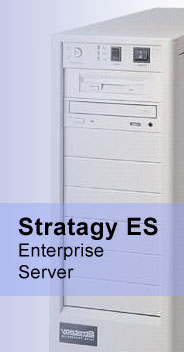
Stratagy
ES
(Enterprise Server)
The Stratagy ES is Toshiba's
most advanced voice processing system, providing an innovative approach to
managing and distributing voice, fax and e-mail messages, as well as offering
self-service transaction capability for your customers. Stratagy ES is available
in four stand-alone platforms supporting four to 96 ports With a wide range of
advanced standard and optional applications, Stratagy ES is equipped to meet the
most demanding voice processing requirements.
This advanced feature processes
commands from the caller's voice, making communication easy and intuitive. Using
simple spoken responses, callers can quickly access product information or a
specific person's extension from the Stratagy ES system. Plus, employees who are
out of the office can call in, then simply speak a command to access their voice
mailbox. With these capabilities, Speech Recognition helps maximize the ease and
effectiveness of both incoming customer calls and internal employee calls, while
projecting an innovative image for your company.
Text-To-Speech
This leading-edge technology enables any
touch-tone telephone to audibly read e-mail messages to you. Text-To-Speech
capability gives traveling employees easy access to e-mail when they don't have
access to your computer system or the Internet. This feature also makes it easy
to forward or reply to e-mail messages - all remotely via any telephone With
Text-To-Speech at their fingertips, your employees can obtain their e-mail
messages anywhere, anytime That gives them the power to stay productive, make
instant decisions and immediately react to urgent business opportunities and
situations.
Stratagy CTX Soft keys
Strata CTX soft keys control lets
you efficiently and easily navigate mailbox menus by viewing them at a glance.
Your Strata CTX digital telephone Liquid Crystal Display (LCD) visually shows
Stratagy mailbox menu options. You can access each menu option by simply
pressing the corresponding soft key. Once you've selected an option, the LCD
displays the next set of feature-usage options.
Unified Messaging
With Unified Messaging, you can
conveniently retrieve and send voice, fax, and e-mail messages from within your
e-mail client inbox screen. You can even retrieve Stratagy voice and fax
messages via the Internet from any e-mail service that supports SMTP and POP3
protocols. Play voice messages through your PC speakers or through your handset
for privacy. Display and print a fax on your screen. Forward voice or fax messages
as WAV or TIF files to any e-mail address. You can also easily manage voice, fax
and e-mail messages via telephone - a must for employees without computer
access.
Fax Server
The Fax Server feature stores inbound
faxes in your mailbox and allows them to be printed; forwarded, or displayed on
your PC screen. As a result, you'll open a world of unprecedented communication
opportunities. Fax On Demand and Fax Back enable users to receive brochures,
price lists or other printed information from the Stratagy system. Ideal for
traveling employees, Fax Mail lets the user transmit faxes left in their mailbox
to a portable computer fax device or hotel fax machine for printing. Fax
Broadcast lets you instantly transmit any fax document to multiple recipients.
You can even add voice comments to a fax.
|